
اختر المنطقة
- اختر المنطقة
- أستراليا

- مصر
- هونج كونج

- الهند

- إندونيسيا

- ماليزيا

- الفلبين
- المملكة العربية السعودية

- سنغافورة
- تايوان
- تايلاند
- المملكة المتحدة

- الإمارات العربية المتحدة
- الولايات المتحدة الأمريكية

- فيتنام
عربي
Resources
تواصل معناحولحلول


Attract new customers to your brand
Leverage our affiliate network to reach new customers for your products and services. Search for relevant affiliates and partners with engaged audiences who are in-market and ready to buy. Our global network enables you to promote your brands to millions of customers.
Plans & Service
Plans & Service
Discover our range of Platform Plans & Service Plans to unlock the technology & service behind our premium partnership marketing campaigns. Explore to grow your sales and improve your performance.
المسوقين


Partner Types
Partners
Discover why Optimise is the affiliate network & partnerships platform of choice for so many Partners. Explore the Advertiser Directory to create new relationships, grow your network and leverage our extensive range of partner tools.
المُعْــلنين

Advertisers
Reach across our extensive network of Marketplaces and learn why global advertisers work with our network of quality publishers. Explore our Partner Platform technology & Service Plans backed by our team of local experts.
Introducing a Simpler, Smarter Optimise Navigation
Introducing a Simpler, Smarter Optimise Navigation
Introducing a Simpler, Smarter Optimise Navigation
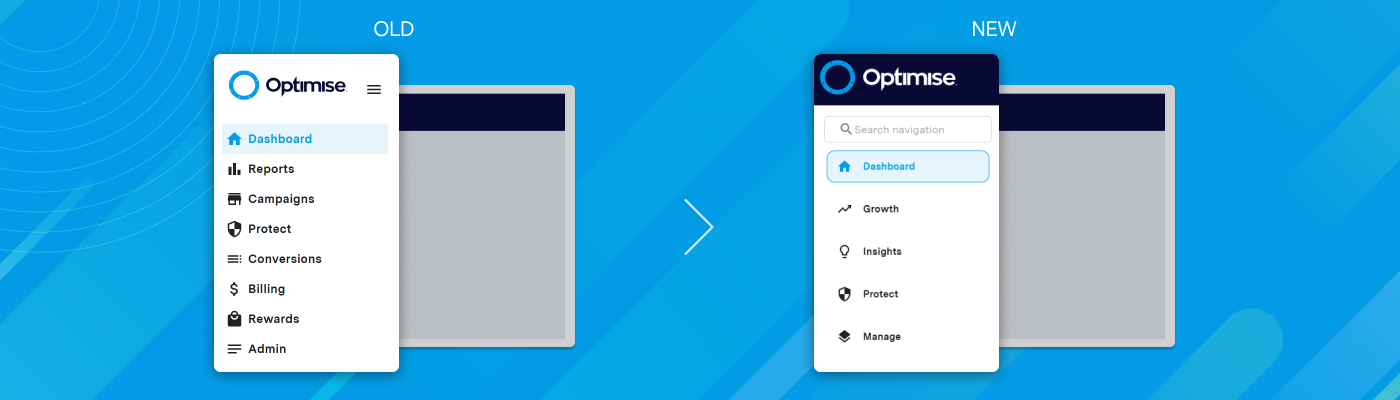
We’re introducing a new Optimise navigation designed to make the platform simpler, faster, and easier to use.
This update is all about improving the day-to-day experience. Less searching. Fewer clicks. Clearer workflows.
As Optimise expanded, the platform naturally became more feature rich. The challenge was making those features easier to access without losing the depth and flexibility users rely on.
That’s exactly what this new structure is designed to solve.
The platform is now organised into four streamlined areas, Growth, Insight, Protect, and Manage, making it easier to move between tasks and find the tools you need quickly.
In this article, we’ll explain:
- What changed
- Why we changed it
- How the new structure works
- What it means for your day-to-day workflow
The Challenge: Growth Created Complexity
Optimise has evolved significantly over the years.
New tools were added to support:
- Affiliate programme management
- Reporting and analytics
- Compliance monitoring
- Brand protection
- Operational administration
- Revenue optimisation
The platform became more powerful but as more features were added, navigation became more difficult.
Users told us the navigation felt overly complex, with inconsistent feature grouping and too many steps to access commonly used tools.
This wasn’t about missing functionality. It was about usability, which is the focus of this redesign.
The Solution: A Faster, More Intuitive Optimise Experience
This is where things change.
Instead of organising features by legacy menus or technical categories, the new navigation is built around what users are trying to achieve.
The platform is now organised into four core areas. Let’s take a closer look at what each area is designed to help you do.
Growth: Tools That Help You Scale
The Growth area focuses on performance-driving activity.
This is where users manage the commercial side of affiliate and partner marketing.
You’ll find tools related to:
- Campaign performance
- Partner management
- Recruitment workflows
- Revenue-driving activity
- Programme growth opportunities
The goal is simple: make it easier to move from insight to action.
How It Helps
- Keeps campaign activity in one place
- Makes partner and revenue tasks easier to manage
- Speeds up day-to-day execution
- Helps teams act on opportunities faster
Insight: Reporting and Analytics in One Place
Data is only useful if teams can access it quickly.
The Insight section brings reporting and analytics tools together into a clearer reporting workspace.
This includes:
- Performance reporting
- Revenue analytics
- Trend monitoring
- Conversion insights
- Data-led optimisation tools
Instead of searching across multiple menus, teams can now access reporting tools from a single area.
How It Helps
- Gives teams quicker access to reporting
- Helps teams identify performance trends more quickly
- Supports faster optimisation decisions
- Improves visibility across programme performance
Protect: Brand Safety and Compliance Monitoring
Compliance and traffic quality are no longer side features. They’re central to programme management.
The new Protect area groups together tools focused on:
- Brand safety
- Content compliance
- Traffic quality monitoring
- Fraud prevention
- Risk management
This structure makes monitoring easier for both operational and compliance teams.
How It Helps
- Centralises compliance and monitoring activity
- Makes protection workflows easier to manage
- Separates monitoring from campaign execution
- Improves oversight across programme risk
Manage: Operational and Admin Tools
The Manage section is where teams handle setup and operational administration.
This includes:
- Account settings
- User permissions
- Platform configuration
- Operational tools
- Administrative controls
These tools are important, but they shouldn’t slow down daily workflows.
Separating them from campaign activity creates a cleaner experience across the platform.
How It Helps
- Keeps admin tasks separate from campaign work
- Makes account management easier to navigate
- Clarifies responsibilities across teams
- Simplifies onboarding for new users
What’s Moving Where
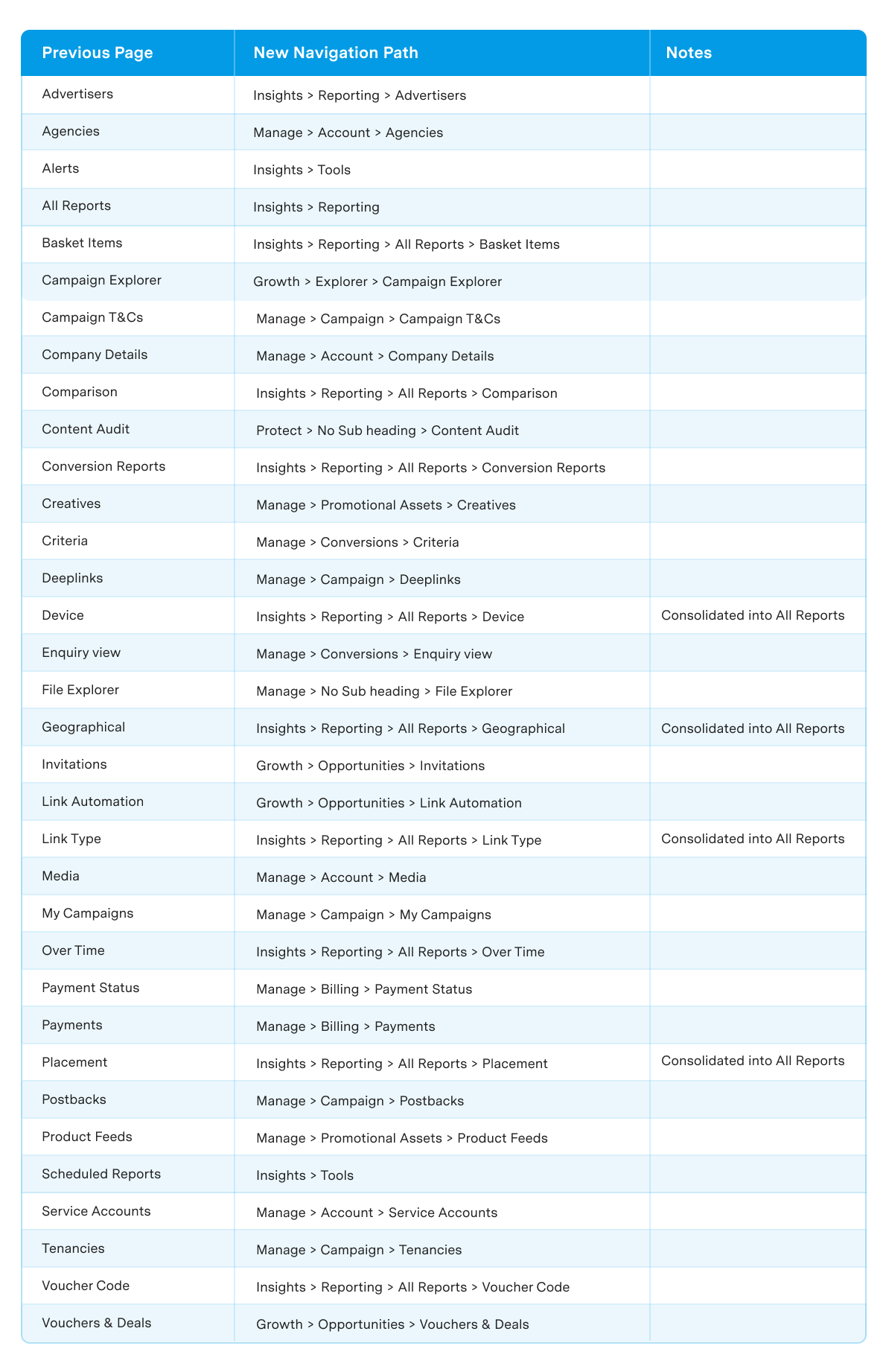
We’ve regrouped related tools and workflows to make the platform easier to navigate.
Here are the examples of where features now live in the updated experience:
The below image provides a high-level overview of where commonly used advertiser tools and functionality can now be found in the updated navigation.
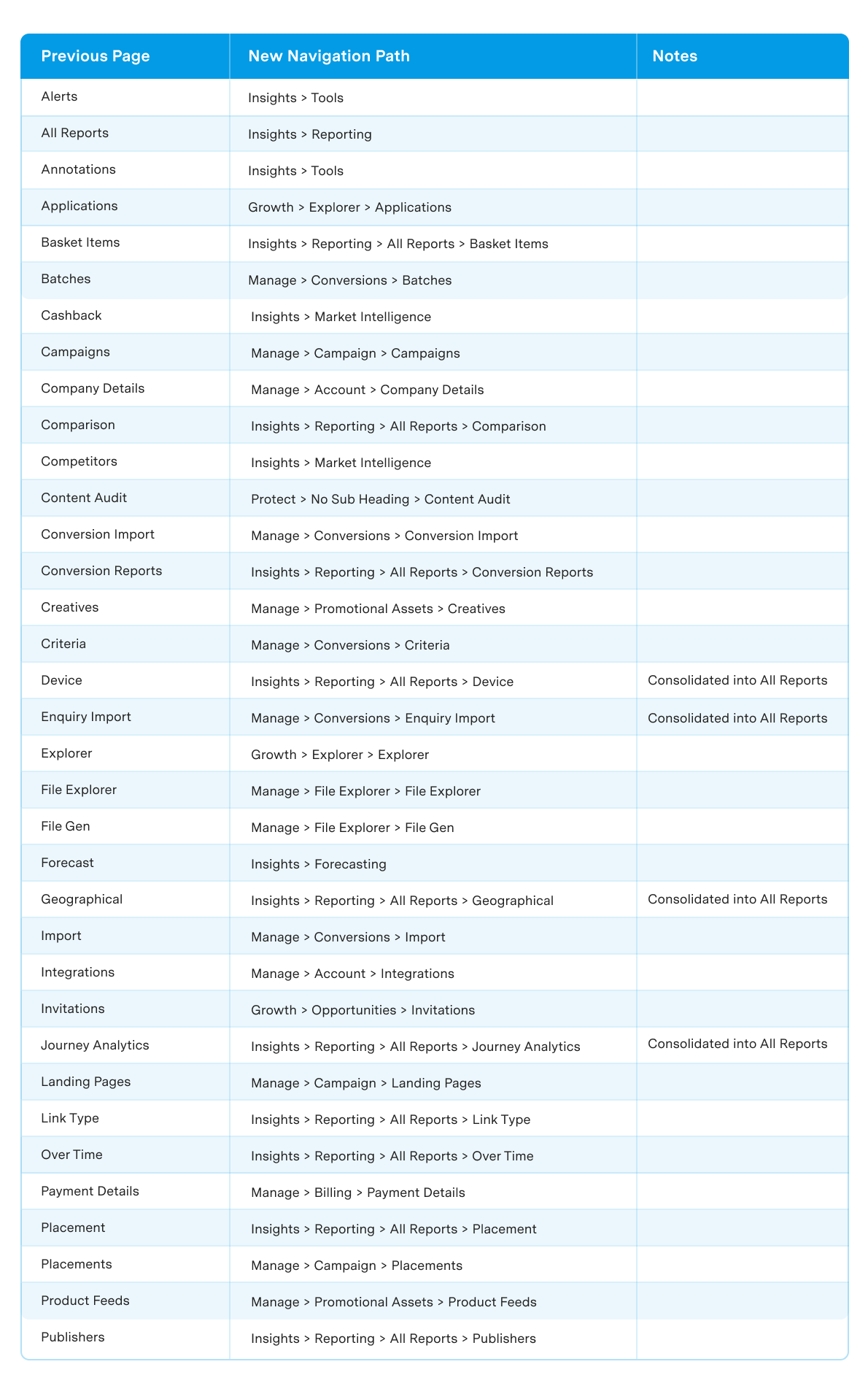
The below image provides a high-level overview of where commonly used publisher and partner tools and functionality can now be found in the updated navigation.
Key Benefits of the New Optimise Navigation
Faster navigation: Users can reach common tools with fewer clicks.
More intuitive workflows: Features are grouped around goals, not technical categories.
Better alignment with how teams work: Campaign managers, analysts, compliance teams, and administrators now have clearer workflows.
Easier onboarding: New users can understand the platform structure much faster.
Reduced friction: Less time spent searching means more time spent optimising performance.
What You Need to Do
For most users, no action is required. Your existing functionality and access remain unchanged.
We recommend:
- Exploring the new layout
- Reviewing updated guidance materials
- Familiarising your team with the four core areas
The structure may feel different at first. But most users adapt quickly because the workflows are now more consistent.
Support and Resources
We know navigation changes can disrupt habits. That’s why we’ve created supporting resources to help teams transition smoothly.
Available resources include:
- Full Feature Relocation Guide
- Optimise Knowledge Base
Why This Change Matters
Most platforms add features over time; very few simplify them.
This update is about making Optimise easier to use without reducing capability. The tools are still there, but the workflows are simply clearer.
So, the better question isn’t “What changed?” it’s “How much faster can teams now get things done?”