











解決方案


Attract new customers to your brand
Leverage our affiliate network to reach new customers for your products and services. Search for relevant affiliates and partners with engaged audiences who are in-market and ready to buy. Our global network enables you to promote your brands to millions of customers.
Plans & Service
Plans & Service
Discover our range of Platform Plans & Service Plans to unlock the technology & service behind our premium partnership marketing campaigns. Explore to grow your sales and improve your performance.
夥伴

廣告商

Advertisers
Reach across our extensive network of Marketplaces and learn why global advertisers work with our network of quality publishers. Explore our Partner Platform technology & Service Plans backed by our team of local experts.
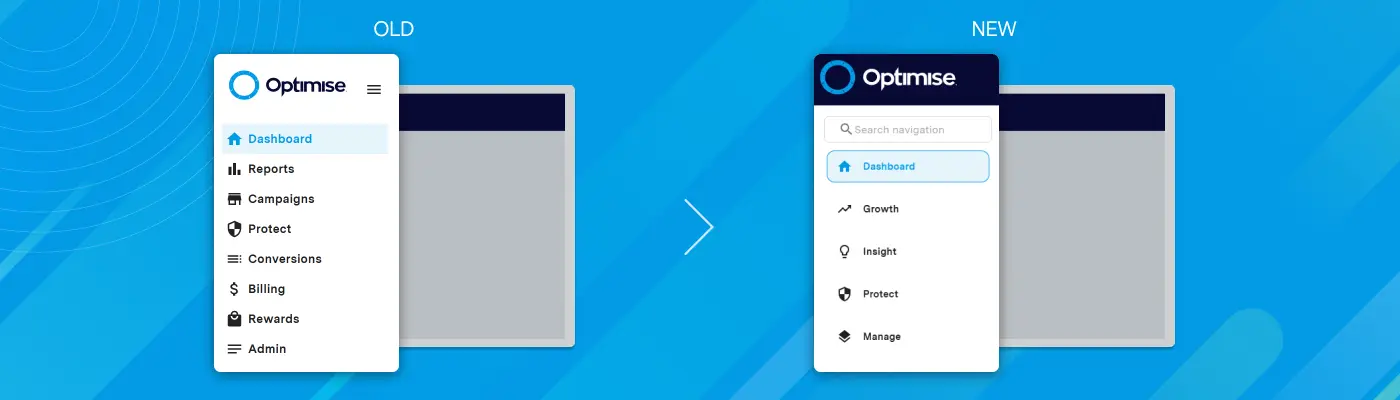
The New Optimise Navigation: Built Around Your Goals
The New Optimise Navigation: Built Around Your Goals
The New Optimise Navigation: Built Around Your Goals
We've got some exciting news to share.
Over the past few months, we've been working behind the scenes to make Optimise easier to navigate and use easier to use. Today, we're excited to introduce the new Optimise navigation.
This isn't just a new menu structure. It's a simpler, more intuitive way to work in Optimise.
Whether you're growing partnerships, analysing performance, protecting your programme or managing operations, the tools and insights you need are now organised around the outcomes you're trying to achieve.
The result is a faster, more connected experience that helps you move seamlessly between workflows and take action with confidence.
In this article, we'll walk you through what's changing, why we made the update and what it means for you.
Powerful Platform, Simpler Experience
Over the years, Optimise has evolved into a comprehensive platform that supports every aspect of partnership and affiliate programme management.
As your needs have grown, we've introduced powerful capabilities across:
- Affiliate programme management
- Reporting and analytics
- Compliance monitoring
- Brand protection
- Operational administration
- Revenue optimisation
This continuous innovation has given access to more tools, more insights, and greater control than ever before.
Now, we're taking the next step.
We've redesigned the platform navigation to make it easier, faster, and more intuitive to find exactly what you need.
The result is the same powerful platform, now with a more streamlined experience that helps you work more efficiently and get more value from every feature.
Smarter Navigation Built Around Your Goals
Find what you need based on what you want to achieve. The new Optimise navigation is organised around four areas that reflect how you manage and grow your partnerships.
Instead of grouping features by legacy menus, we've structured the platform around the outcomes that matter most to you.
- Growth – Discover opportunities and drive performance
- Insight – Understand what's working and where to optimise
- Protect – Safeguard your brand and programme quality
- Manage – Keep operations running smoothly
Nothing has been removed. We've simply reorganised the platform to make it easier to find what you need and take action faster.
What This Means for You
- Spend less time finding tools and more time driving results
- Move from insight to action more quickly
- Make onboarding faster for new users
- Work more confidently with a clearer platform structure
Feature Relocation Mapping
Advertisers
Here are a few examples of where commonly used features can now be found:
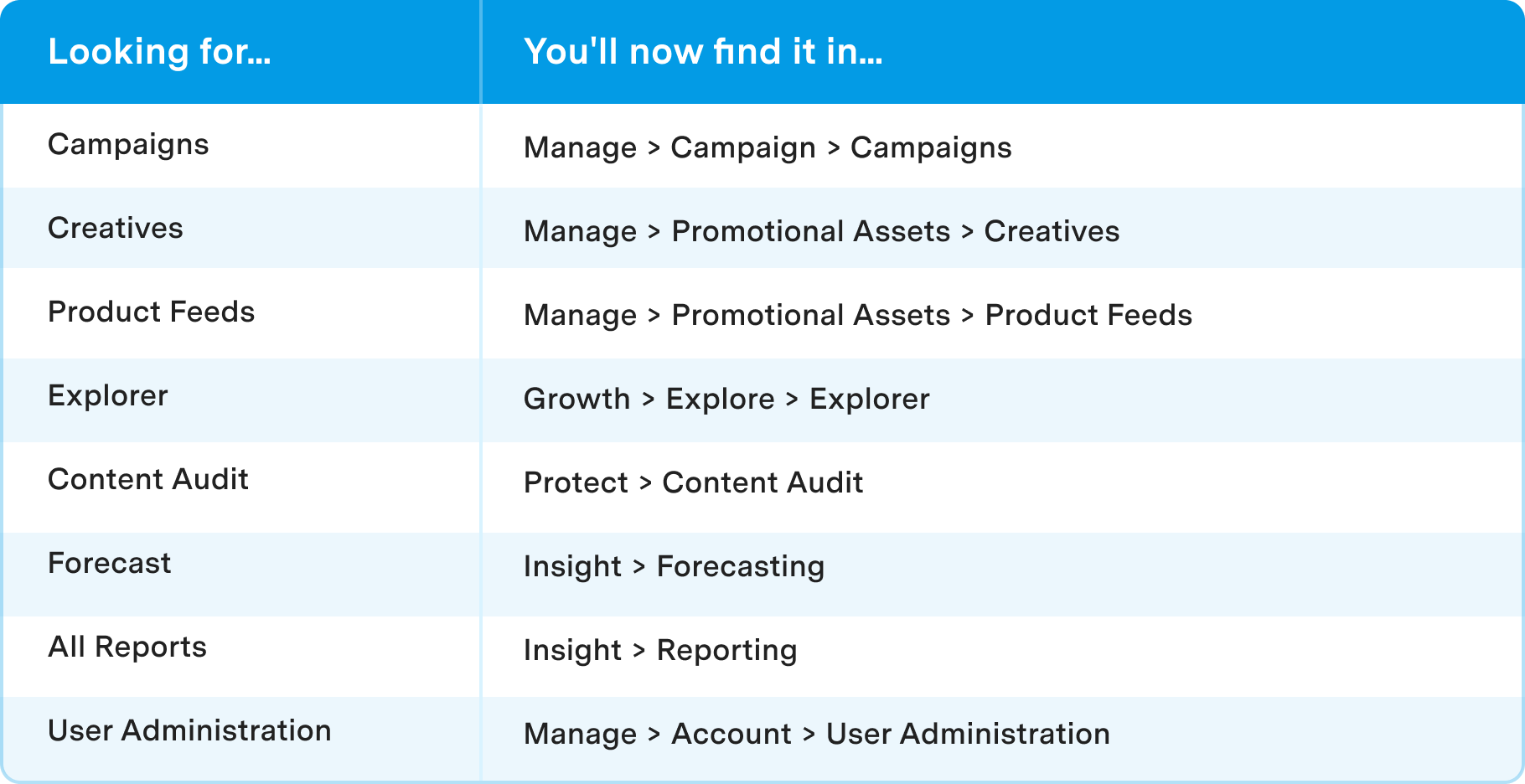
The full guide includes a complete feature-by-feature mapping of the previous and updated navigation structures.
Publishers & Partners
Use this guide to find where commonly used features now live across Growth, Insight, Protect and Manage.
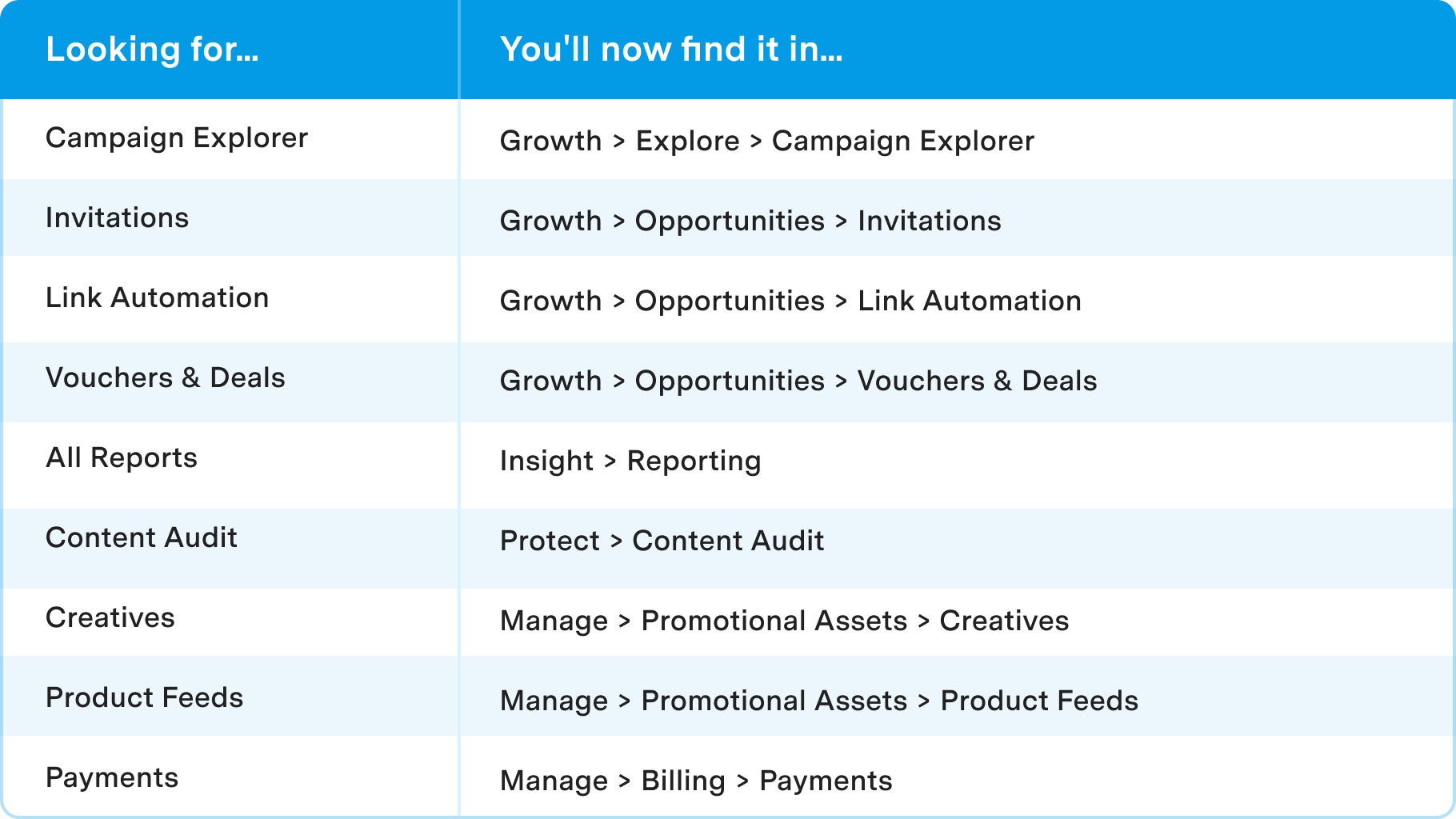
For a complete feature-by-feature mapping of the previous and updated navigation structure, download the full relocation reference guide below.
Get Started
You don't need to change any settings or update your account.
Explore the new navigation and use the feature relocation guides to see where existing functionality now lives.
The new structure is designed to make common features easy to find and important tasks quick to complete.
Support and Resources
We've created additional resources to help you get the most from the new navigation:
-
Video Walkthrough – Take a quick tour of the new navigation experience and see what's changed.
-
Optimise Knowledge Base – Access advertiser and publisher navigation guides, FAQs and support articles.